2.10. Data Entry Details
This section covers all data-entry and command usage details that may not have
been fully elucidated in the preceding scenarios.
2.10.1. Date Formats
2.10.2. Scheduling Dialogs
Ed. Note: I think it would be quite good to summarize these requirements in
tabular form, with one table for each class of dialog, with one table row for
each data-entry field in the dialog.
The following data entry formats apply to any scheduling dialog where the
indicated field appears:
-
The Title and Location fields are free-form, one-line
strings. If the text is longer than will fit in the provided data-entry area,
then it will automatically scroll as the user types and can be repositioned
using the normal text movement arrow keys or such other forms of horizontal
scrolling as may be available on a particular implementation platform.
-
The (Start) Date and End Date are type-in fields, with
checking for legal date syntax. The following are legal forms of date entry:
...
2.10.2.1. Defaults
If the user specifies a recurring event without checking any box in the
additional recurring information, the event will be set by default to recur
weekly, on the day of the week that is specified for the start date of the
event. [Sketch: some other defaults are made clear by default display of
selection box.]
Also explain what the standard defaults are for the settings of all dialog
fields and note that these default settings can be changed in the by editing
preferences.
2.10.3. Required Fields
When scheduling or changing an item, the following fields are required to be
non-empty and properly formated: Title, (Start) Date, Start Time, and Duration.
If one or more of these fields is missing when the user presses the
'OK' or 'Change' button, the system responds with the error
dialog shown in Figure 63.
-- To appear. --
Figure 63: Required fields error dialog.
2.10.4. Selecting Viewing Targets
The first five commands in the 'View' menu apply to a user-selected
target in the calendar display, or to a default target. To select a viewing
target, the user clicks on a desired location somewhere in the current display
window. The "current display window" is defined precisely as the display
window most recently generated by the system or the window most recently made
current by the user having clicked on it or selecting it in the 'View
Windows' menu. The following are the specific details for how a viewing
target is selected in the current display window:
For the 'View Item' command, an item is selected as follows:
-
In a day, week, or month view, the user selects a scheduled item by clicking
anywhere on the time range or title of the item.
-
An item cannot be selected in a year view, since no times or titles are
displayed there.
-
If no item is explicitly selected by the user, the default is the first item,
if any, scheduled on today's date. If there is no such item, then the
'View Item' command has no effect. (The exact system response to
commands with no effect is described in
Section 2.11.1
on error conditions.)
For the 'View Day' command, a day is selected as follows:
-
In a table- or list-style week view, the user selects a day by clicking on any
of the day names that label the table columns, or on any item in a desired day.
-
In a list-style week view, a month view, or a year view, the user selects a day
by clicking on the numeric date of any day, or on any item in a desired day.
-
If the current display window is a day view, the 'View Day' command
has no effect.
-
If no day is explicitly selected by the user, the default is today's date.
For the 'View Week' command, a week is selected as follows:
-
In a day view, the selected week is the one that contains the currently
displayed day.
-
In a month or year view, the user selects a week by clicking on the numeric
date of any day within the desired week, or on any item in a day within the
desired week.
-
If the current display window is a table-style week view, the 'View Week
Table' command has no effect; if the current display window is a list-
style week view, the 'View Week Lists' command has no effect.
-
If no week is explicitly selected by the user, the default is the week
containing today's date.
For the 'View Month' command, a month is selected as follows:
-
In a day or week view, the selected month is the one that contains the
currently displayed day or week.
-
In a year view, the user selects a month by clicking on the name of any month
or on the date of any day within the month.
-
If the current display window is a month view, the 'View Month'
command has no effect.
-
If no month is explicitly selected by the user, the default is the month
containing today's date.
For the 'View Year' command, a year is selected as follows:
-
In a day, week, or month view, the selected year is the one that contains the
currently displayed day, week, or month.
-
If the current display window is a year view, the 'View Year' command
has no effect.
-
If no year is explicitly selected by the user, the default is the year
containing today's date.
In all of the cases where a name or numeric date is selected, the system
confirms the selection by highlighting the name or date in reverse video. For
example, Figure 64 shows how the system highlights the date of September 1 when
the user clicks on that date number in the monthly display.
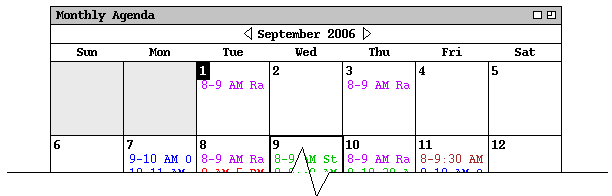
Figure 64: Reverse video selection highlighting.
When a view command is completed by the display of the appropriate window, the
highlighted selection is changed back to normal type font.
2.10.5. Deletion of Scheduled Items
2.10.6. Overlapping Items
The system provides a three-way option to control the scheduling of items with
overlapping times. The option settings are the following:
-
disallow overlapping times entirely
-
allow overlapping times, with warning
-
allow overlapping times, no warning
When the first of these settings is selected, the system prevents the user from
scheduling two or more items with any time overlap. With the second setting,
the system allows overlapping items but warns when overlapping items are
scheduled. When the third option is selected, overlapping items are allowed to
be scheduled without warning.
Prev: help
| Next: error-conditions
| Up: functional
| Top: index