2.3.6. Test Generation Settings
The scenario in this section illustrates an individual user accessing and altering settings for test generation.
When the user selects the settings icon from either the generate test menu or the create test menu,
the system displays the dialog shown in Figure 20.
The settings allow the user to set the amount of 'wiggle' room allowed when generating questions.
The settings include:
- Question Length margin of freedom
- Test Length margin of freedom
- Question Difficulty margin of freedom
- Last Used margin of freedom
Question and test length settings are set to be within +/- a number of units from the user's original parameters
The user may set the margins of freedom to only progress in a positive or negative range,
as well as reaching out to both ranges.
The last used setting is set by months within last using the question. The greater the number of months, the more questions will be filtered out.
The default settings are show in Figure 20.
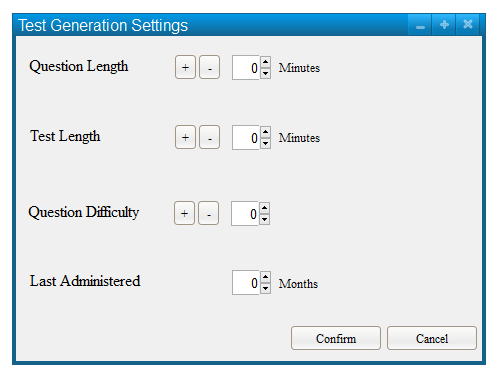
Figure 20: Default Settings Dialog.
The user sets their preferred margin's of freedom and then may press confirm to save changes, or cancel to cancel any changes.
An updated settings menu is detailed in Figure 21.
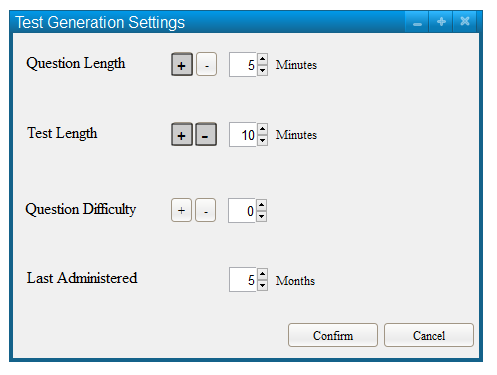
Figure 21: Updated Settings Dialog.
The settings in Figure 21 work as follows:
- Question length may be up to 5 minutes greater than specified by the user, but no less
- Test length may be up to 10 minutes shorter or up to 10 minutes longer than specified by the user
- Question difficulty must be the exact number the user specified
- The questions chosen must not have been used within the past 5 months
The user is then returned to the previous generation dialog.
Prev: Advanced Generation of Tests
| Next: none
| Up: tests
| Top: index