
This tutorial describes the Raw Listing Report
Figure 1: empty Raw Listing Report
In Figure 1 is shown a empty example of the Raw Listing Report. There are visible only the column headings: Sections, Room, Teacher, Time Block and Start Time.
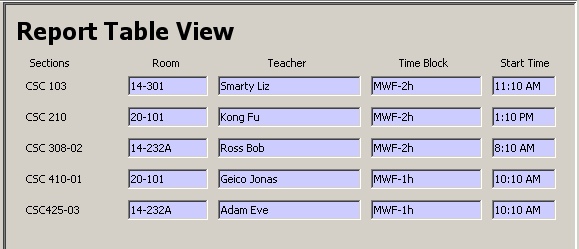
Figure 2: Raw Listing Report example
In the example in Figure 2 can be seen how a filled out Raw Listing Report looks like. Note: The Raw Listing Report is generated by the Deepthought Scheduler Tool automatically. This is only possible if a Schedule is generated before.