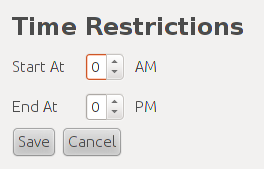
The scheduling admin has the ability to set the abolute time limit for all scheduled items. Nothing can be scheduled outside of the limits set in the Time Restrictions context menu as seen in Figure 1.
Figure 1: Time Restrictions Screen
The Start At spinner sets the earlier time limit while the End At spinner sets the later time limit. For each of these spinners the value must be between one and twelve.
Once the user has set both values then clicking Save will validate the fields and if successful they will be saved in the scheduling database. If not then the user will be presented with a dialog saying what is wrong with the values. When the user is finished he can press the Cancel button and any unsaved changes will be discarded.